Marketer optimizing content for generative search engines in 2025

How to Optimize Content for Generative Search Engines (AEO / GEO) in 2025

Introduction:

Search is changing fast. In 2025, Google, Bing, and AI-based engines don’t just show links anymore. They create direct answers, summaries, and suggestions using AI.

This change is called Generative Search. It’s powered by AEO (Answer Engine Optimization) and GEO (Generative Engine Optimization). If your content isn’t ready for this, it may vanish from search visibility.

At MrWebApp, we help brands prepare for this shift. Here’s a complete, simple guide to make your content ready for Generative Search in 2025.

1. From SEO to AEO and GEO

Traditional SEO focuses on:

  • Keywords
  • Rankings
  • Backlinks

Generative Search focuses on:

  • Clear and factual answers
  • Organized content
  • Context and meaning

You are no longer writing for just Google crawlers. You are writing for AI systems that understand intent and context.

In short:

  • SEO → Helps you rank in search results.
  • AEO → Helps AI use your content in direct answers.
  • GEO → Helps AI understand your content’s meaning and relationships.

2. How AI Search Engines Read Your Website

AI-based search engines scan your website differently. They don’t look for just keywords — they look for structure and clarity.

Here’s what they check:

  • Clear question and answer format
  • Logical headings (H2, H3)
  • Short sentences and lists
  • Verified data and dates
  • Author name and brand authority
  • Structured schema (FAQ, HowTo, Article)

If your content is messy or unclear, AI may skip it. So, always make your content easy to read and easy to understand.

3. Key AEO & GEO Ranking Factors in 2025

To appear in AI search results, your content should include:

  • Question-style headings like “How does AEO work?”
  • Short, direct answers in the first few lines
  • Linked pages that connect related topics
  • Facts, examples, and data to prove your point
  • Author bio and date for trust
  • Schema markup for structure
  • Readable layout with short paragraphs and lists

These points make your website both human-friendly and AI-friendly.

4. Write for AI Answers and Snippets

AI tools like Google SGE and Perplexity take short parts of your content to make quick answers. To help them, follow this pattern for writing:

  • Start with a question or problem
  • Give a short answer in one or two sentences
  • Then explain the reason in a few lines

Example: Question: What is AEO? Answer: AEO means optimizing your content so AI can easily pick and use it in direct answers. It focuses on structured writing, short answers, and factual accuracy.

When you use this format, AI engines can easily understand and credit your website as the source.
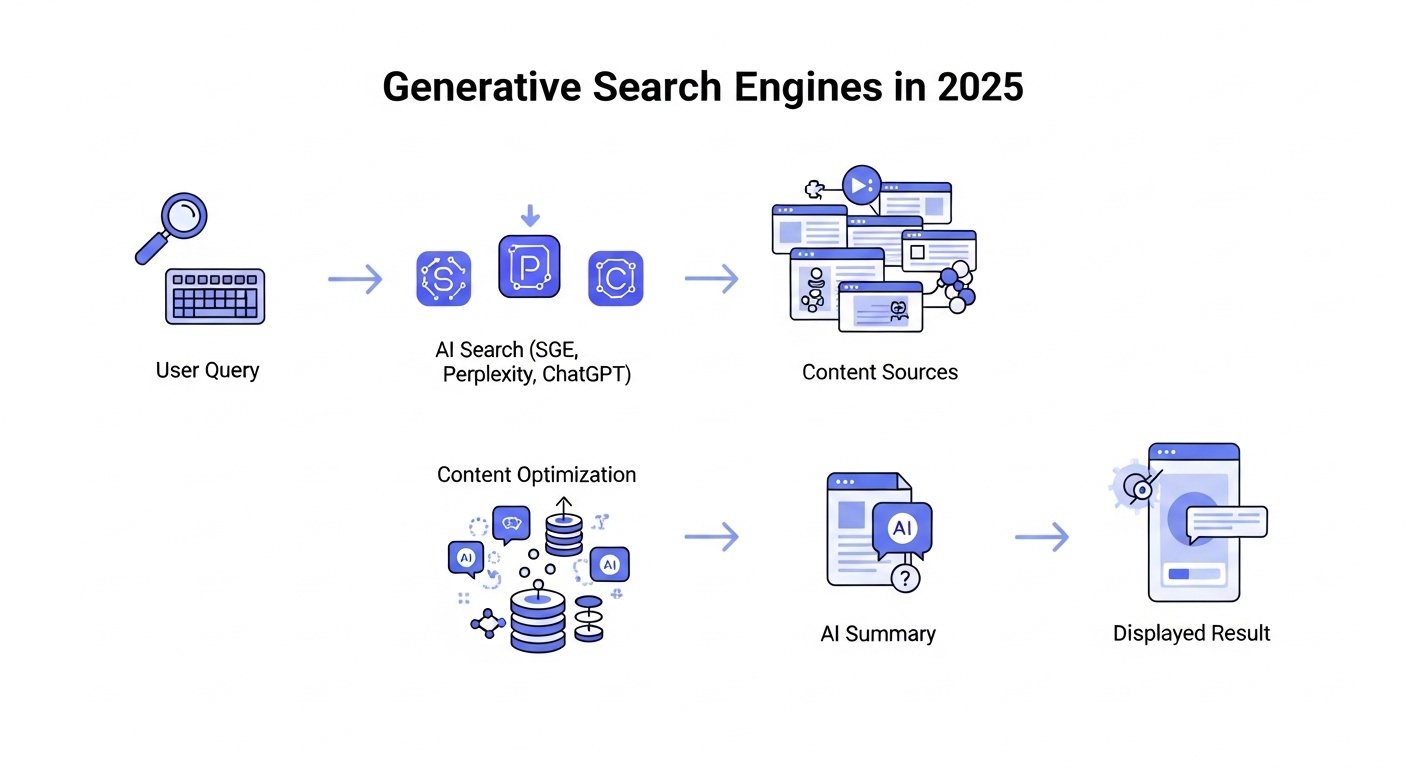
Diagram showing how generative search engines work in 2025
How AI search engines collect and summarize website content in 2025

5. Use Schema Markup

Schema markup is code that tells AI what your content means. It helps AI engines show your answers in better positions.

The best schema types for 2025 include:

  • FAQPage for questions and answers
  • HowTo for step-by-step guides
  • Article for blogs and insights
  • Product for eCommerce pages
  • Review for testimonials

At MrWebApp, we add schema markup with smart SEO tools and custom scripts.

6. Create Topic Clusters

Topic clusters help AI understand what your site is about. They also build authority in your niche.

Here’s how:

  • Choose one main topic (like “Generative SEO”)
  • Write several related posts (like “AI search trends,” “AEO content writing,” etc.)
  • Link all related posts to your main topic page

This shows AI that your website covers the subject in depth. It also helps users find related content easily.

7. Focus on E-E-A-T

E-E-A-T means Experience, Expertise, Authority, and Trust. Generative search engines prefer trusted sources.

Improve your E-E-A-T by:

  • Adding real author names and bios
  • Linking to trusted external sources
  • Including client testimonials
  • Showing case studies
  • Keeping your content updated

At MrWebApp, we help brands create E-E-A-T-friendly content that AI systems trust.

More users now speak their queries using AI assistants. Instead of typing short phrases, they ask long questions.

Example: Instead of “SEO tools,” they ask,

“What are the best SEO tools for online stores in 2025?”

To prepare for this, you should:

  • Write in a natural, human tone
  • Include FAQs and conversational phrases
  • Avoid robotic keyword stuffing

This improves visibility in voice search and AI chat results.

9. Use Real Data and Examples

AI engines want reliable content, not vague opinions. Use real-world examples, case studies, or data.

You can add:

  • Research-backed facts
  • Screenshots or charts
  • Before-and-after case results
  • Step-by-step visuals

At MrWebApp, we add real data and visuals that AI engines prefer to show.

10. Improve Technical SEO for GEO

Your website’s technical setup still matters. AEO and GEO perform best on fast, secure, and mobile-friendly sites.

Here’s your technical checklist:

  • Website loads under 2 seconds
  • Mobile-first responsive design
  • Secure HTTPS and SSL setup
  • Image compression enabled
  • No broken links or redirects
  • Updated sitemaps and schema

At MrWebApp, we use speed and security optimization tools to make websites GEO-ready.

11. Add FAQs at the End of Each Page

Adding FAQs helps AI engines quickly find and show answers. Keep your questions short and your answers clear.

Example:

Q: What’s the difference between AEO and SEO? A: AEO focuses on making content ready for AI answers. SEO focuses on ranking in Google search results.

Q: Why is GEO important in 2025? GEO helps your site show up in AI search results that display short summaries.

FAQs also make your content more useful for users and more visible in AI-driven results.

12. Keep Content Fresh

AI tools prefer updated information. If your content is old, it might not show in generative answers.

To stay relevant:

  • Update facts and screenshots regularly
  • Add new data every few months
  • Refresh examples and case studies
  • Review meta tags and schema

MrWebApp clients receive quarterly content updates to keep their sites AI-friendly and current.

13. Track GEO Performance

You need tools that track your AI search visibility. Traditional rank tracking isn’t enough anymore.

Use tools like:

  • BrightEdge Copilot – to track visibility in AI summaries
  • AlsoAsked.com – to find related questions
  • NeuronWriter or Surfer AI – to optimize semantic writing
  • Google Search Console (SGE beta) – for monitoring AI appearances

These tools help you see how well your content performs in the new AI search environment.

14. Future of Generative Optimization

Generative optimization is about helping AI understand you — not tricking it. The future of GEO will focus on:

  • Verified facts and sources
  • Structured and conversational content
  • Personalization based on user intent
  • Voice-first and chat-style browsing

If you prepare now, you’ll lead when the search landscape changes even more.

SEO is no longer just about being found — it’s about being understood. Generative engines reward websites that provide clear, factual, and organized information.

If your site doesn’t meet AEO and GEO standards, it may fade from results completely.

At MrWebApp, we help businesses build content and websites that AI engines love. We help you write clear content and set up schema so your site is ready for future search.

✅ Want your content to appear in AI-generated answers? Let’s make your website AEO and GEO optimized for 2025. Contact MrWebApp — and stay visible in the new AI-powered search world.
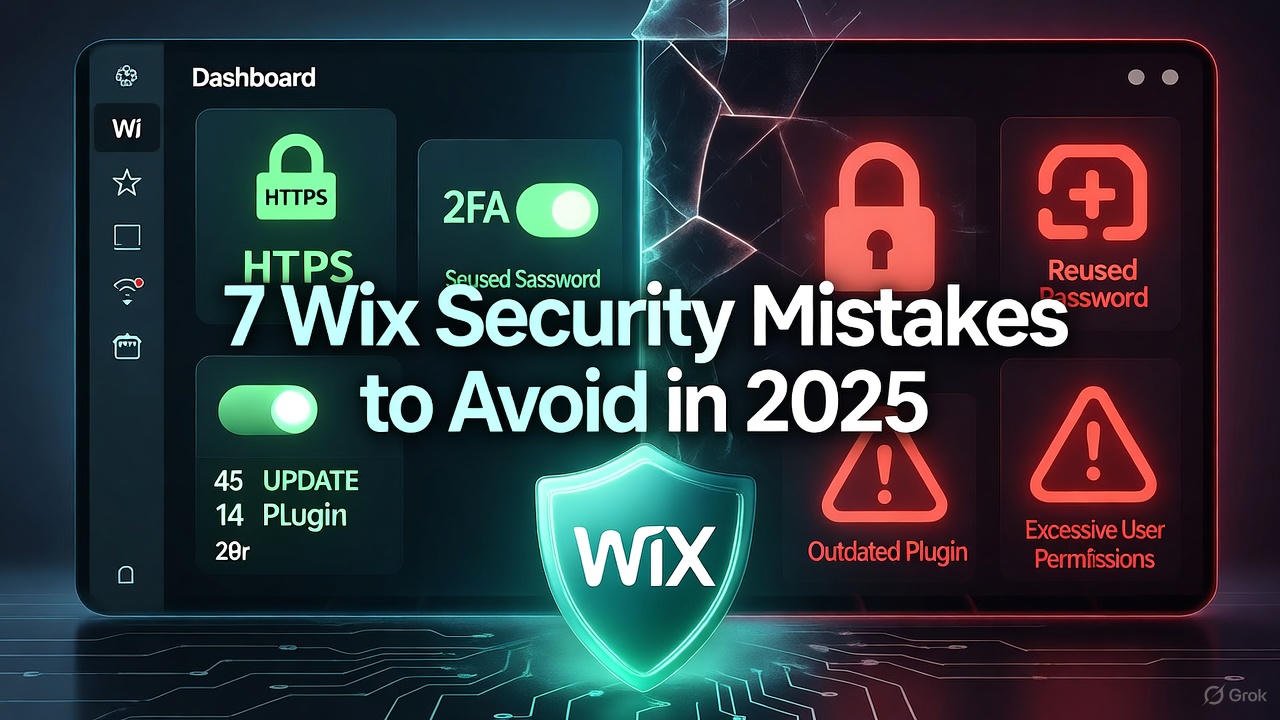

Wix website owners can avoid major security mistakes in 2025 by using SSL, strong passwords, and regular backups

7 Wix Security mistakes to avoid in 2025

Running a Wix website in 2025 is easier than ever, but that convenience also brings new security risks. Many site owners assume Wix handles everything, yet even the best platforms need smart management. Below are the most common Wix website security mistakes you should avoid this year — and how to fix them quickly.


1. Ignoring HTTPS Setup

Many Wix users skip enabling HTTPS, assuming Wix does it automatically. While Wix provides free SSL, you must make sure it’s activated. Without HTTPS, your website shows “Not Secure,” which scares away visitors and lowers SEO rankings.
Always check your Wix Dashboard → Settings → Site SSL Certificate and confirm it’s on.


2. Weak or Reused Passwords

A shocking number of security breaches come from simple passwords like 123456 or reusing the same password across accounts. In 2025, AI-based attacks can guess weak passwords in seconds.
Use a password manager and enable two-factor authentication (2FA) to protect your Wix account and connected emails.


3. Not Updating Apps and Plugins

Every app on your Wix site — even from the official App Market — can become a target if not updated. Developers often release security patches that you might miss.
Check your dashboard weekly for pending app updates, and remove plugins you no longer use.


4. Giving Too Many Permissions to Team Members

Many business owners add editors or freelancers without limiting permissions. If someone leaves your team, they might still have access to your site.
In 2025, always assign roles carefully: Owner, Admin, Editor, or Contributor. Update roles regularly and remove old accounts.


5. Not Backing Up the Website Regularly

Wix allows you to restore previous versions of your site, but few users take advantage of it. Cyberattacks, design errors, or accidental deletions can cause massive losses.
Set a reminder to create manual backups every month and download essential data offline for safety.


6. Ignoring User Data Protection Rules

With stricter privacy laws in 2025, ignoring GDPR and similar data policies can cause fines and loss of trust.
Add a Privacy Policy page and clear cookie consent banners. Always encrypt customer data collected through forms or payment pages.


7. Thinking “Wix Handles It All”

While Wix has strong default security, it’s not a full replacement for responsible site management. Hackers often target user habits, not platforms.
Take small steps: use strong passwords, check updates, manage access, and monitor your site’s analytics for unusual activity.


Wix website owner reviewing security settings to avoid common mistakes in 2025
Wix websites stay secure in 2025 with smart habits like SSL, updates, and backups

🔗 Internal Links


🌍 External Links


❓ FAQs

1. Is Wix secure for small businesses in 2025?
Yes, Wix is secure by default, but users must manage passwords, updates, and permissions actively.

2. How do I enable SSL on my Wix site?
Go to Settings → Site SSL Certificate, and toggle it on. Wix provides it for free.

3. Does Wix automatically back up my website?
Wix saves versions, but it’s best to make manual backups regularly.

4. Can hackers access my Wix account easily?
Only if you use weak passwords or share access carelessly. Enable 2FA for extra safety.

5. What are the best security plugins for Wix?
Wix has built-in features, but use apps like Site Booster and Visitor Analytics for monitoring.


💬 Conclusion

In 2025, keeping your Wix website secure is more about smart habits than complex tools. Focus on HTTPS, updates, and user access to build trust and protect your data.
For more website safety and optimization guides, visit mrwebapp.com — your trusted source for smarter web solutions.

Illustration showing Wix SEO mistakes and their impact on Google rankings.

Common Wix Mistakes That Hurt Your SEO Rankings ( Complete Guide 2025 )

Wix is one of the most popular website builders in the USA and UK, thanks to its drag-and-drop features and user-friendly interface. Small businesses, bloggers, and even startups choose Wix because it makes website creation simple without coding knowledge. However, while Wix is great for design flexibility, many users unknowingly make mistakes that damage their SEO rankings.

Search engine optimization (SEO) is crucial if you want your website to appear on Google, attract organic traffic, and convert visitors into customers. Unfortunately, several common Wix mistakes can hold you back from achieving the visibility your business deserves. In this guide, we’ll break down the most frequent errors, explain why they hurt your SEO, and show you how to avoid them.

If you need professional help with Wix SEO optimization, our Wix website development services at MR WebApp are tailored for businesses in the USA and UK.


1. Ignoring Mobile Optimization

Google prioritizes mobile-first indexing, meaning if your website isn’t optimized for smartphones, your rankings will suffer. Many Wix users design their sites beautifully on desktop but forget to check how the site looks and performs on mobile.

Even small issues like overlapping text, unoptimized images, and slow-loading pages can push your site lower in search results. Our detailed article on speeding up Wix websites on mobile can help you resolve this.


2. Overloading with Apps and Widgets

Wix offers hundreds of apps and widgets, but overusing them can slow down your website speed, which is a key ranking factor for Google. A slower website increases bounce rate, frustrates users, and negatively impacts your SEO.

Instead, only use apps that add real value to your site, and regularly check your site speed using tools like Google PageSpeed Insights.


3. Poor Use of Wix SEO Settings

Wix has built-in SEO tools, but many beginners either don’t configure them properly or leave them blank. Failing to update title tags, meta descriptions, and slugs means you’re missing opportunities to rank for your target keywords.

For example, a slug like www.yoursite.com/page1 is less SEO-friendly than www.yoursite.com/best-cafe-in-london. Make sure every page on your site has unique, optimized SEO settings.


4. Using a One-Page Website Without Strategy

Wix makes it easy to create one-page websites, but they’re not always SEO-friendly. When all your content is on one page, search engines may struggle to understand the context of your site, limiting your ranking opportunities.

If you want to build a one-page site properly, check our guide on creating a portfolio website in Wix without coding.


5. Not Migrating When It’s Time

While Wix is excellent for small businesses, some companies eventually outgrow its limitations. Migrating from Wix to WordPress can unlock more SEO flexibility, plugins, and advanced customization. Many businesses in the US and UK have already made this switch for better scalability. If you’re at this stage, read our complete guide on migrating a website from Wix to WordPress.


6. Forgetting About Schema Markup

Schema markup helps search engines understand your content better, allowing features like rich snippets to appear in search results. Unfortunately, many Wix users skip this step, losing out on higher click-through rates.

Using free tools like Google’s Structured Data Markup Helper can make this process easier.


7. Not Connecting a Custom Domain Properly

A website without a custom domain looks unprofessional (yourname.wixsite.com). Worse, it can negatively affect your SEO trustworthiness. If you’re struggling to connect your domain, follow Wix’s official guide.

For businesses that want a professional setup, we at MR WebApp also offer assistance with custom domain integration, mobile application development (learn more here), and complete digital solutions.


No matter how beautifully you design a Wix site, if you don’t build backlinks or create quality content, your rankings won’t improve. Backlinks from trusted websites like Moz or Ahrefs play a huge role in SEO performance.

To get backlinks, publish blogs, collaborate with partners, and submit your business to directories relevant to the US and UK markets.


9. Not Tracking Analytics

Finally, failing to integrate Google Analytics and Search Console means you won’t know how your site is performing. Many Wix owners rely only on Wix’s built-in stats, which lack depth. Connecting to Google’s tools helps you track keyword rankings, bounce rates, and traffic sources effectively.


How MR WebApp Helps You Avoid These Mistakes

At MR WebApp, we specialize in building Wix websites that are SEO-friendly, mobile-optimized, and fully customized for businesses in the USA and UK. From technical fixes to content strategy, we help you avoid the mistakes that most Wix users make.

If you want to discuss your project, simply email us and our team will guide you.


FAQs

Q1: Is Wix good for SEO in 2025?
Yes, Wix has improved its SEO tools significantly. However, success depends on how well you use these features and whether you avoid common mistakes.

Q2: Can a Wix website rank on Google in the USA and UK?
Absolutely. With proper optimization, backlinks, and content, Wix sites can rank well in competitive markets like the US and UK.

Q3: Do I need to hire a professional for Wix SEO?
If you’re serious about growth and don’t have SEO knowledge, hiring experts like MR WebApp ensures you don’t make costly mistakes.

Q4: How do I know if my Wix site has SEO issues?
You can check with Google Search Console, run speed tests, and audit your site’s SEO settings regularly.

Q5: Can I switch from Wix to WordPress later?
Yes, many businesses migrate from Wix to WordPress for scalability. MR webapp offers smooth migration services.

Connecting a custom domain to Wix website step-by-step 2025

How to Connect a Custom Domain to Wix Easily – 2025 Guide

Your website’s domain name is the face of your online presence. If you’re using Wix for your business website, connecting a custom domain makes your site look professional, trustworthy, and brand-ready. Many small businesses in the USA and UK prefer Wix for its simplicity, but struggle when it comes to connecting a domain.

This step-by-step 2025 guide will help you connect your custom domain to Wix easily, while also sharing some tips to make sure your website is secure, fast, and SEO-friendly.


Why Do You Need a Custom Domain for Your Wix Website?

Using a Wix subdomain (like yourname.wixsite.com) doesn’t look professional. A custom domain (like yourbusiness.com) makes your brand stand out and builds trust. It also improves your website’s SEO, which is important if you want to target competitive markets in the USA and UK.

Benefits of using a custom domain:

  • More professional and credible
  • Easier for customers to remember
  • Boosts search engine rankings
  • Helps build strong branding

If you’re serious about your online presence, a custom domain is non-negotiable.


Step 1: Purchase a Custom Domain

You can buy a domain directly from Wix or from an external registrar like GoDaddy, Namecheap, or Google Domains.

  • Buying from Wix is easier, but sometimes more expensive.
  • Buying from external registrars can save money and give you more control over DNS settings.

👉 For businesses in the USA and UK, choosing a .com domain is the best option.


Step 2: Upgrade to a Premium Wix Plan

You can’t connect a custom domain to Wix on the free plan. You’ll need to upgrade to a Wix Premium Plan that supports custom domains.

Pro Tip: If your website is for a restaurant, café, or small business, upgrading also unlocks professional features like Google Analytics and ad vouchers.

If you’re unsure about which plan to choose, you can check this detailed breakdown on Wix Plans and Pricing.


Step 3: Connect Your Domain

You have two methods to connect your domain to Wix:

  1. Pointing Method (Recommended) – You keep your domain registered with your current provider (GoDaddy, Namecheap, etc.) and just update DNS settings to point to Wix.
  2. Transferring Method – You move your entire domain registration into Wix.

Most professionals recommend the pointing method, as it gives you flexibility to switch providers later if needed.

To point your domain:

  • Log in to your domain registrar (e.g., GoDaddy).
  • Find DNS Settings or Name Server Management.
  • Replace your current DNS records with Wix’s name servers.
  • Save changes and allow 24–48 hours for propagation.

Step 4: Verify and Test Your Connection

Once you’ve updated DNS, return to Wix and verify your domain connection. Wix will show a notification once your domain is successfully connected.

Always test your site by visiting your custom domain in a browser. Check both desktop and mobile versions to make sure everything looks good.


Step 5: Secure Your Domain with SSL

Wix automatically provides a free SSL certificate for your domain. An SSL certificate ensures your site loads with HTTPS (not HTTP). This is critical for SEO and for customer trust, especially if you’re running e-commerce.


Common Issues When Connecting a Domain to Wix

  1. DNS Propagation Delay: Sometimes it takes up to 48 hours for changes to reflect globally.
  2. Wrong Nameservers: Double-check that your DNS records match Wix’s instructions exactly.
  3. Expired Domain: Ensure your domain subscription is active and renewed on time.

If you face difficulties, Wix’s support team is responsive, or you can reach out to professional developers at MR WebApp Services.


FAQs

Q1: How long does it take to connect a domain to Wix?
It usually takes 24–48 hours for DNS settings to propagate worldwide.

Q2: Can I use a domain I already own?
Yes, you can connect a domain purchased from GoDaddy, Namecheap, or other registrars by updating DNS records.

Q3: Do I need to pay extra for SSL on Wix?
No, Wix provides SSL certificates for free with every connected domain.

Q4: Is Wix good for small businesses in the USA and UK?
Yes, Wix is beginner-friendly and great for small businesses. But for more advanced features, custom development may be a better option.

Q5: Can I transfer my domain from Wix to another provider later?
Yes, you can transfer out your domain anytime if you use the pointing method.


Final Thoughts

Connecting a custom domain to Wix in 2025 is easier than ever. With the right steps, you can give your small business a professional online presence in just a few hours.

If you need expert help beyond Wix, MR Webapp offers website development & mobile application development services tailored for businesses in the USA and UK. Reach us at info@mrwebapp.com to discuss your project.

A custom domain is the first step to building a trustworthy brand online — make sure you do it right.

Wix website loading fast on a smartphone in 2025

How to Speed Up a Wix Website for Mobile Users in 2025

Mobile performance can make or break your online presence in 2025. With most users in the USA and UK browsing websites on their phones, a slow Wix site can cost you traffic, leads, and even sales. The good news? You can significantly speed up your Wix website for mobile users with the right strategies.


Why Mobile Speed Matters in 2025

Google prioritizes mobile-first indexing, meaning your site’s mobile version directly impacts rankings. A slow site leads to higher bounce rates and fewer conversions. For small businesses, startups, and entrepreneurs, especially in competitive markets like New York or London, this can mean losing valuable clients.


Practical Steps to Speed Up a Wix Website

1. Optimize Images

Large images are the number one cause of slow loading times. Compress and resize images before uploading them. Wix automatically optimizes some files, but you can also use external tools like TinyPNG or ImageOptim for better results.

2. Enable Lazy Loading

Lazy loading ensures that images load only when users scroll to them, reducing initial load time and improving perceived speed.

3. Limit Animations and Heavy Elements

Too many videos, sliders, or parallax effects can slow down a Wix site. Keep the design clean and lightweight.

4. Use a Fast & Reliable Hosting

Wix provides hosting by default, but you should regularly monitor performance. Tools like GTmetrix and Google PageSpeed Insights help measure speed and identify bottlenecks.

5. Minimize Apps and Plugins

Extra apps add bulk. Uninstall unused or outdated apps to keep the site lean.

6. Prioritize Mobile Responsiveness

Always preview changes on mobile. Fonts, images, and buttons should load quickly and display properly on smaller screens.

7. Regular SEO Maintenance

Optimizing speed is part of SEO. If you’re serious about growth, explore advanced solutions like MR WebApp’s Shopify development services or our WordPress solutions to achieve scalable performance beyond Wix.

8. Consider a Redesign if Needed

If your current template is too heavy, moving to a lightweight design or even exploring professional development services like MR WebApp’s Figma to WordPress conversion can give you more speed and flexibility.


FAQs

1. Why is my Wix website slow on mobile?
Heavy images, animations, and too many apps are common reasons for slow mobile performance.

2. Can I really speed up Wix websites, or do I need custom development?
You can improve speed with optimizations, but custom solutions often deliver better results for long-term scalability.

3. How does website speed impact SEO in 2025?
Google’s Core Web Vitals prioritize fast, mobile-friendly sites. A faster site means higher rankings and more traffic.

4. Should small businesses in the USA and UK switch from Wix?
Not always. Wix is great for beginners, but businesses aiming for advanced SEO and scalability often migrate to platforms like WordPress or Shopify.


Final Thoughts

A fast mobile experience is no longer optional in 2025—it’s essential. By following these tips, you can reduce load times, improve user experience, and boost conversions. If your Wix site is still underperforming, consider reaching out to info@mrwebapp.com for professional help.

MR WebApp specializes in website development & mobile application development services, helping businesses in the USA and UK stay ahead with cutting-edge digital solutions.

Example of Wix templates designed for small cafés and restaurants

Best Wix Templates for Small Cafes and Restaurants 2025

In today’s digital-first world, every café and restaurant needs a professional website to attract customers. Whether you’re running a coffee shop, bakery, or fine-dining restaurant, your online presence is often the first impression customers have of your brand. That’s where Wix templates can help — offering beautiful, customizable designs perfect for small cafes and restaurants.


Why Choose Wix for Cafes and Restaurants?

Wix is one of the most popular website builders for small businesses because it’s easy to use, affordable, and comes with plenty of design options. For restaurant owners who don’t have the time or resources for custom development, Wix templates can provide a professional look without technical hassles.

If you’re later planning to scale, you can always migrate or upgrade your site with professional support like WordPress development from MR WebApp.


Best Wix Templates for Small Cafes & Restaurants

1. Café Express Template

Perfect for coffee shops and bakeries. This template highlights menu items, customer reviews, and has an integrated order button.

2. Fine Dining Template

Elegant, modern, and designed to show off your food photography. Works great for upscale restaurants.

3. Food Truck Template

Mobile-friendly and eye-catching, ideal for food trucks and small cafés that want to showcase their locations and daily menus.

4. Bistro Delight Template

A simple yet stylish option with easy navigation and strong reservation features.

5. Vegan Café Template

Trendy design, perfect for niche cafés. Comes with blog functionality for sharing recipes or updates.


Key Features of Wix Templates for Restaurants

  • Mobile Responsiveness: Customers often browse on their phones.
  • Online Reservations: Integrated booking options save time.
  • Menu Display: Templates come with built-in menu design layouts.
  • SEO Ready: Basic SEO features are included, though for advanced optimization, agencies like MR WebApp’s wix website development services can help.

For inspiration, check out how Wix Restaurants showcases their menu integrations on their official site.


Wix vs Other Platforms

While Wix offers easy drag-and-drop designs, it’s not always the most scalable. Businesses with growth plans often switch to solutions like WordPress or Shopify. For example, see how MR WebApp provides Shopify development solutions for food businesses.

If you want a deeper comparison, Website Builder Expert’s Wix review offers a detailed breakdown.


FAQs

1. Are Wix templates free for restaurants?
Yes, Wix offers free templates, but you may need a premium plan for advanced features like online ordering and reservations.

2. Can I customize Wix templates for my café’s branding?
Absolutely. Wix allows you to change fonts, colors, images, and layouts to match your brand identity.

3. Is Wix good for SEO for local restaurants?
Wix has basic SEO features. However, for competitive local SEO, a professional agency like MR WebApp can help optimize your site further.

4. Can I migrate from Wix to another platform later?
Yes, though it requires technical steps. Many businesses start with Wix and later move to platforms like WordPress or Shopify for scalability.

5. Do Wix templates support online orders?
Yes, Wix integrates with online ordering and payment gateways. You can set up delivery and takeout features easily.


Final Thoughts

Wix templates are a fantastic solution for small cafés and restaurants that want a beautiful, functional website without the need for custom coding. Whether you’re just starting out or looking for a quick upgrade, these templates provide everything from online reservations to menu displays.

That said, as your business grows, you may need more advanced features or SEO improvements. Partnering with a professional team like MR WebApp can help you scale from a template-based website to a fully custom solution.

Migrating website from Wix to WordPress with step-by-step process for beginners

Migrating Website from Wix to WordPress Step by Step for Beginners ( Complete guide )

Switching from Wix to WordPress may seem challenging at first, but it’s one of the smartest moves you can make for your business. While Wix is beginner-friendly, it has limitations in flexibility, SEO, and scalability. WordPress, on the other hand, offers unlimited customization and better control over your website.

In this guide, you’ll learn the exact steps to migrate your website from Wix to WordPress — without losing content, traffic, or your online presence.


Why Move from Wix to WordPress?

  • Flexibility: WordPress has thousands of plugins and themes.
  • Scalability: Perfect for businesses planning to grow.
  • SEO Benefits: WordPress gives you full control over on-page SEO and performance.
  • Ownership: You truly own your site with WordPress hosting.

If you’re a business in America, UK, or UAE looking for professional help, MR WebApp’s WordPress Development Services can make this migration seamless.


Step 1: Get Hosting and Install WordPress

Choose a reliable hosting provider such as Bluehost, SiteGround, or Hostinger. These providers offer one-click WordPress installation and 24/7 support.

Once installed, log in to your new WordPress dashboard to prepare for migration.


Step 2: Export Content from Wix

Wix does not provide a direct export option, so you’ll need to:

  • Save blog posts using the RSS feed (if enabled).
  • Manually copy text and images.
  • Download any media files you want to reuse.

Step 3: Import Content into WordPress

In WordPress:

  1. Go to Tools > Import
  2. Install the RSS Importer for blog content.
  3. Upload the RSS feed exported from Wix.

For pages and media, copy and paste content into new WordPress pages and upload images manually.


Step 4: Choose a WordPress Theme

Pick a theme that matches your restaurant, business, or portfolio. Platforms like ThemeForest and the WordPress theme library have thousands of options.

For a customized design, you can explore Figma to WordPress Development with MR WebApp.


Step 5: Configure Essential Plugins

Some must-have plugins for beginners include:

  • Yoast SEO – Optimize SEO for each page.
  • UpdraftPlus – Backup your site regularly.
  • Wordfence Security – Protect your website from hackers.

Step 6: Redirect Wix Domain to WordPress

If you purchased your domain through Wix, update the DNS settings to point to your new hosting provider. This ensures your visitors and SEO rankings move seamlessly.

If you’re planning eCommerce migration, don’t miss Shopify Website Development with MR WebApp for professional insights.


Step 7: Test and Launch

  • Check all pages and links.
  • Test forms, buttons, and images.
  • Make sure mobile responsiveness works perfectly.

Once satisfied, announce your new WordPress website on social media!


FAQs

Q1: Will I lose SEO if I move from Wix to WordPress?
If redirects are done properly and content is migrated correctly, your SEO rankings can improve rather than drop.

Q2: How long does it take to migrate?
For small websites, it may take a few hours. For large sites, it could take 2–3 days.

Q3: Can I migrate Wix eCommerce to WordPress?
Yes, but you’ll need to set up WooCommerce in WordPress.

Q4: Is it possible to migrate without technical skills?
Yes, but hiring professionals like MR WebApp ensures a smoother and faster process.


Final Thoughts

Migrating from Wix to WordPress may take some effort, but the long-term benefits are worth it. With better SEO, scalability, and full control over your website, you’re setting up your business for success.

Whether you’re a beginner or a business owner looking to expand online, WordPress gives you the power to grow.

Restaurant owner managing WordPress website maintenance checklist

WordPress Maintenance Checklist for Local Restaurants

Running a local restaurant means keeping customers happy with great food and service. But in today’s digital world, your restaurant’s WordPress website plays a big role too. It helps people find you online, view your menu, make reservations, and order food. To keep everything working smoothly, you need regular website maintenance.

Here’s a complete WordPress maintenance checklist for local restaurants to make sure your site stays secure, fast, and customer-friendly.


1. Update WordPress Core, Themes, and Plugins

Outdated plugins or themes are one of the main reasons websites get hacked. Always update your:

  • WordPress core
  • Active theme
  • Installed plugins

Set up automatic updates whenever possible, but test them before pushing live to avoid conflicts.


2. Backup Your Website Regularly

Imagine your restaurant’s website going down right before a busy weekend. Backups save you from disasters.

  • Schedule daily or weekly backups
  • Store them securely on the cloud
  • Test your backup files to ensure they work

3. Optimize Website Speed

Restaurant customers won’t wait for a slow-loading site. Optimize speed by:

  • Compressing images
  • Using a caching plugin
  • Minimizing CSS and JavaScript
  • Choosing fast hosting

check out MR WebApp s WordPress services.


4. Secure Your Website

Restaurant websites often collect reservations, emails, and sometimes payment info. Keep data safe with:

  • SSL certificate (HTTPS)
  • Security plugins like Wordfence or Sucuri
  • Limiting login attempts
  • Two-factor authentication

5. Keep Your Menu Updated

Menus are one of the most-visited pages on restaurant websites. Make sure yours:

  • Displays accurate pricing
  • Highlights specials
  • Removes unavailable items
  • Uses high-quality food images

A broken reservation link or menu page frustrates customers. Use plugins like Broken Link Checker or online tools to scan and fix broken URLs.


7. Mobile Responsiveness

Most restaurant searches happen on mobile devices. Test your site on different screen sizes to ensure:

  • Easy navigation
  • Quick access to phone number & address
  • Simple reservation forms

consider it MR WebApp s website development services.


8. Improve SEO for Local Searches

Local SEO ensures people nearby find your restaurant. Key tasks include:

  • Adding your restaurant to Google Business Profile
  • Using local keywords like “best Italian restaurant in [city]”
  • Embedding Google Maps
  • Gathering customer reviews

9. Test Online Reservations and Contact Forms

Your booking system must always work. Test forms regularly to confirm emails are delivered and reservations go through.


10. Monitor Website Analytics

Keep track of how many people visit your site, where they come from, and what they do. Tools like Google Analytics help you measure success and improve.

Final Thoughts

Maintaining your restaurant’s WordPress website isn’t just about security — it’s about providing a smooth experience for hungry customers. By following this checklist, your website will stay reliable, fast, and ready to turn online visitors into loyal diners.

If you need professional help with WordPress maintenance or restaurant website development, MR WebApp can manage updates, security, and optimization for you.

FAQs

1. How often should I maintain my restaurant’s WordPress site?
At least once a month, but security updates should be applied immediately.

2. Do I need professional help for maintenance?
Not always, but hiring experts can save time and ensure nothing is missed.

3. What happens if I don’t maintain my site?
Your website could get hacked, slow down, or lose customers due to outdated information.

4. Can maintenance improve my restaurant’s SEO?
Yes, optimized speed, updated plugins, and regular content updates help boost rankings.


Why Choose MR WebApp over Wix for Custom Website Design in America

Why Choose MR WebApp over Wix for Custom Website Design in America

Introduction

In today’s digital-first world, your website is more than just an online presence — it’s the face of your business. For many small businesses and startups in America, the first question is whether to go for a DIY platform like Wix or partner with a professional development agency like MR WebApp.

While Wix offers simplicity and quick drag-and-drop design, it struggles to deliver the flexibility, scalability, and SEO power that modern businesses demand. On the other hand, MR WebApp specializes in custom website development and mobile application services that are built for long-term growth.

In this article, we’ll dive deep into why MR WebApp is the smarter choice over Wix for businesses in the United States looking for custom website design.


1. The Limitations of Wix for Businesses in America

Wix has gained popularity because of its beginner-friendly design. However, business owners often face challenges:

  • Template restrictions – Thousands of sites end up looking similar.
  • Limited coding freedom – Advanced customization isn’t possible without workarounds.
  • Performance issues – Sites carry unnecessary code, leading to slower load times.
  • SEO struggles – Wix websites often underperform in competitive markets like the U.S.

For startups or local businesses, Wix may seem cost-effective at first, but it can become an obstacle as your brand grows.


2. Why MR WebApp is a Better Alternative

At MR WebApp, we believe every business deserves a unique and high-performing website. Here’s what sets us apart:

  • Custom design tailored to your brand – No cookie-cutter templates.
  • Scalable solutions – From small websites to enterprise-level platforms.
  • SEO-driven development – Built with Google’s ranking factors in mind.
  • Long-term support – Dedicated team for updates, security, and growth.

Internal link: Learn more about our WordPress Website Development with MR WebApp.


3. SEO: The Battle Between Wix and MR WebApp

Search Engine Optimization (SEO) can make or break your online visibility.

Wix SEO Limitations

  • Offers only basic SEO tools.
  • Limited control over technical elements like schema, redirects, and sitemaps.
  • Slower websites mean lower rankings.

MR WebApp’s SEO Advantage

  • In-depth keyword optimization for U.S. markets.
  • Technical SEO setup: schema, XML sitemap, and canonical tags.
  • Lightweight websites optimized for Core Web Vitals.
  • Integration with Google Analytics and Search Console.

Internal link: See how we help businesses with Shopify Website Development with MR WebApp.


4. Website Performance and Speed

Page speed directly impacts bounce rate and conversions.

  • Wix Websites: Struggle with bloated code, leading to higher load times.
  • MR WebApp Websites: Built on clean code, fast-loading, and mobile-optimized.

Our team runs every website through Google PageSpeed Insights and GTMetrix to ensure high performance.

Internal link: Learn how we optimize designs through Figma to WordPress with MR WebApp.


5. Custom Features and Integrations

Businesses in America often need advanced features like:

  • E-commerce integration
  • Payment gateways (Stripe, PayPal, Apple Pay)
  • Multi-language support
  • CRM/ERP integration
  • Booking and appointment systems

With Wix, such features are either not possible or come with expensive plugins. MR WebApp builds these features customized to your exact business needs.


6. Cost Analysis: Wix vs MR WebApp

Many businesses choose Wix because of its low upfront cost. But here’s the truth:

  • Wix Hidden Costs: Premium plans, plugins, storage, and bandwidth add up.
  • MR WebApp Value: One-time development with long-term ROI, higher conversions, and fewer redesigns needed.

In the long run, MR WebApp proves to be more cost-effective.


7. Long-Term Growth with MR WebApp

A Wix website might help you start, but it won’t help you scale. MR WebApp provides:

  • Dedicated support team
  • Regular updates and security patches
  • Growth-oriented strategies for SEO and ads
  • Consultation for digital transformation

This makes us the long-term partner for businesses in America.


8. Case Studies: American Businesses Choosing MR WebApp

  • New York Startup – Migrated from Wix to MR WebApp’s custom WordPress solution, boosting organic traffic by 220% in 6 months.
  • Texas E-commerce Store – Shifted from Wix to Shopify with MR WebApp and reduced page load time by 40%, resulting in higher conversions.
  • California Agency – Needed advanced integrations; Wix couldn’t deliver, but MR WebApp built a scalable platform tailored to their workflow.

External References (for authority)


FAQs

Q1: Why is MR WebApp better than Wix for businesses in America?
MR WebApp offers scalable, SEO-friendly, and custom solutions that Wix cannot provide due to its template limitations.

Q2: Is MR WebApp more expensive than Wix?
Initially, yes — but in the long run, MR WebApp provides more value by reducing hidden costs and boosting ROI.

Q3: Can MR WebApp migrate my Wix website?
Yes, our experts specialize in migrating Wix websites to WordPress, Shopify, or custom platforms.

Q4: Does MR WebApp only work in America?
No, we serve clients worldwide, but we have dedicated strategies for businesses in the U.S. market.

Q5: Does MR WebApp also provide mobile application development?
Absolutely. We offer website development and mobile app development services under one roof.


Conclusion

If you’re a business owner in America, choosing between Wix and MR WebApp comes down to one question: Do you want a quick fix, or a long-term growth partner?

Wix is fine for beginners, but when your business demands performance, SEO, and scalability, MR WebApp is the better investment. With our team of expert developers, marketers, and designers, your website won’t just look good — it will perform, rank, and grow with your business.

Partner with MR WebApp today, and take the first step toward a future-proof digital presence.

Wix vs Mr WebApp Choosing the Right Partner for Your Website Success

Wix vs Mr WebApp: Choosing the Right Partner for Your Website Success

Introduction

In today’s fast-paced digital world, having a strong online presence is not optional — it’s a necessity. Platforms like Wix have made website building simple, accessible, and cost-effective, especially for startups, freelancers, and small businesses. However, as businesses grow, the need for customization, advanced features, and professional guidance becomes unavoidable.

This is where MrWebApp, a professional website and app development company, steps in. Unlike DIY website builders, MrWebApp helps businesses design, customize, and scale their Wix websites in ways that align with their brand goals.

In this article, we’ll explore Wix as a platform, discuss how MrWebApp complements it, and compare the two so you can make the best decision for your business.


What is Wix?

Wix is one of the most popular website builders in the world, powering over 250 million websites globally. It is widely used in Western countries, especially by creative professionals, coaches, bloggers, and small businesses who want a quick way to get online.

Some key features of Wix include:

  • Drag-and-drop builder for easy website design
  • Wix App Market with plugins for bookings, e-commerce, and marketing
  • Pre-designed templates tailored to industries like restaurants, fitness, and e-commerce
  • Wix ADI (Artificial Design Intelligence) that builds a site for you in minutes
  • SEO tools for better search visibility

Wix has earned global recognition thanks to its user-friendly approach. But while Wix makes building a website simple, growing that website into a business tool often requires expert support.


What is MrWebApp?

MrWebApp is a professional website and mobile app development company that helps businesses and individuals take their websites to the next level. Unlike DIY builders, MrWebApp offers custom solutions that are tailored to your brand, industry, and goals.

Services offered by MrWebApp include:

  • Custom Wix website design & development
  • Advanced Wix e-commerce setup (payment gateways, product pages, sales funnels)
  • SEO optimization for Wix websites
  • Website redesign and migration from Wix to custom platforms (WordPress, Shopify, custom code)
  • Performance optimization (speed, mobile-friendliness, security)
  • Long-term maintenance and support

While Wix gives you the platform, MrWebApp gives you the strategy, design expertise, and technical skills to make your Wix website truly stand out.


Wix vs MrWebApp: A Detailed Comparison

Let’s break down how Wix and MrWebApp work together but also differ:

1. Ease of Use

  • Wix: Perfect for beginners; no coding required.
  • MrWebApp: Ideal for professionals who want custom features beyond Wix templates.

✅ Many clients start with Wix but later hire MrWebApp to upgrade their site without losing its simplicity.


2. Design & Customization

  • Wix: Offers 800+ templates, but customization is limited to the platform’s design rules.
  • MrWebApp: Provides fully tailored designs that reflect your brand identity, ensuring your website doesn’t look like a cookie-cutter template.

3. Scalability

  • Wix: Great for small businesses but limited for larger e-commerce or enterprise websites.
  • MrWebApp: Helps scale Wix websites by integrating APIs, third-party tools, and even migrating to more advanced platforms when your business grows.

4. Pricing

  • Wix: Affordable monthly plans starting at around $14/month.
  • MrWebApp: Project-based pricing, ensuring you pay only for the features you truly need.

💡 Many clients use Wix hosting but hire MrWebApp for custom development, giving them the best of both worlds.


5. SEO & Marketing

  • Wix: Provides basic SEO settings (meta tags, URL editing, etc.).
  • MrWebApp: Delivers advanced SEO strategies like schema markup, backlink campaigns, and content marketing — often helping websites outrank competitors.

👉 Example: A restaurant on Wix may set up its menu, but with MrWebApp’s SEO, it can rank higher in “best restaurant near me” searches.


6. Support & Maintenance

  • Wix: Offers 24/7 customer support, but solutions are generic.
  • MrWebApp: Provides personalized ongoing support, handling everything from design changes to troubleshooting technical issues.

Why Many Wix Users Switch to Agencies like MrWebApp

Even though Wix is great for getting started, growing businesses often face challenges such as:

  • Needing advanced design features beyond templates
  • Struggling with SEO ranking
  • Wanting to increase sales through e-commerce optimizations
  • Requiring custom integrations (CRM, booking systems, analytics)

This is why many Wix users turn to companies like MrWebApp, who combine Wix’s ease of use with professional expertise.

According to HubSpot, 72% of businesses that invest in professional website optimization see significant growth in leads and conversions.


Case Studies: Wix and Beyond

  • Wix Example: Famous brands like Karlie Kloss’s coding camp (Kode With Klossy) started with Wix due to its simplicity.
  • MrWebApp Example: Businesses working with MrWebApp benefit from custom solutions that make their websites more powerful, faster, and competitive.

This balance of Wix’s platform + MrWebApp’s expertise is what creates long-term success.


Conclusion: Which One Should You Choose?

If you’re just starting, Wix is an excellent option for building a simple, functional website quickly. But if you want to:

  • Stand out with unique design
  • Optimize for SEO and conversions
  • Scale your website as your business grows
  • Get professional guidance and support

Then MrWebApp is the partner you need.

Wix provides the foundation. MrWebApp builds the skyscraper.

FAQs

What is Wix and why is it popular? Wix is a website builder used by over 250 million websites. It’s popular because it’s easy to use, has drag-and-drop design, and offers templates for many industries.

Is Wix good for new users? Yes, Wix is perfect for beginners with its simple tools and Wix ADI that builds a site in minutes.

How does MrWebApp help with Wix websites? MrWebApp creates custom Wix designs, adds e-commerce features, optimizes SEO, and provides ongoing support to make your site better.

Can I change my Wix site’s look with MrWebApp? Yes, MrWebApp designs unique Wix sites that match your brand, not just use basic templates.

Does Wix work for big businesses? Wix is good for small businesses but can be limited for larger ones, and MrWebApp helps scale it with advanced tools.

How does MrWebApp improve my Wix SEO? MrWebApp uses advanced SEO techniques like backlinks and content marketing to help your Wix site rank higher on Google.

What does MrWebApp charge for Wix services? MrWebApp uses project-based pricing, so you only pay for the features you need, unlike Wix’s monthly plans.

Can MrWebApp fix slow Wix sites? Yes, MrWebApp optimizes speed, mobile-friendliness, and security to make your Wix site fast and safe.

Why do people switch from Wix to MrWebApp? People switch to MrWebApp for better design, SEO, e-commerce, and custom features that Wix alone can’t offer.

How can MrWebApp support my Wix site after it’s built? MrWebApp offers personalized support for updates, fixes, and new features to keep your Wix site running well.